
Can Claude Transcribe Audio? We Tested It With a Scored MP3
Claude has no speech-to-text, but it can build one in its code sandbox. We timed that, a transcription connector and Claude Code on the same scored MP3.
Short answer: not with a built-in feature, but it will try. Claude has no speech-to-text model, and Anthropic's upload page lists no audio or video formats. When we attached an MP3 anyway, Claude accepted it, installed an open-source Whisper model in its code sandbox and returned a good transcript, 21 minutes later. Claude Code with a transcription command line tool returned the same text in 38 seconds.
There are four ways to get a transcript into Claude today:
- Attach the file and let Claude improvise. It writes and runs its own transcription code. Slow, but it worked in our test.
- Add a transcription connector (an MCP server) and ask Claude to use it.
- Use Claude Code, which can run a transcription command line tool on files on your own computer.
- Transcribe elsewhere and paste the text, then ask Claude about it.
Voice mode is not one of them. It turns what you say into a chat message and, according to Anthropic's voice mode help page, deletes the recording. It doesn't read a file you already have.
What Claude says it can read
Anthropic's upload help page (updated 23 July 2026, checked 18 November 2026) lists documents (PDF, DOCX, CSV, TXT, HTML, ODT, RTF, EPUB, JSON, XLSX) and images (JPEG, PNG, GIF, WebP), up to 500 MB per file and 20 files per chat. No audio or video format is on the list.
What the list leaves out is the code sandbox. With
code execution and file creation
turned on (the help page says it's available on every plan, Free included),
files you attach are also copied into a Linux sandbox where Claude can run
programs on them. In our test the MP3 showed up there under
/mnt/user-data/uploads/, which is how Claude could work on it.
The test: one scored MP3, one prompt
We used the recording from our transcript examples and ChatGPT tests: a 64-second interview between two people, made from a written script of 189 words and 14 speaker turns with two text-to-speech voices. Because we wrote the script, every transcript can be scored word for word.
Each run used podcast-bakery-interview.mp3 (about 1 MB) and this prompt:
Transcribe this audio word for word. Label each speaker (Speaker 1,
Speaker 2) and give a timestamp at the start of each speaker turn.
All Claude runs were on a Pro account with Opus 5.5 on 18 November 2026.
| Route | Time to transcript | Real errors (of 189 words) | Speaker turns right |
|---|---|---|---|
| Claude on its own (code sandbox) | ~21 min | 1 after Claude's own fix; 2 in the model output | 14 of 14 after a re-run; 12 of 14 first |
| Claude + ScribeToAny connector, file attached | ~80 s of Claude time plus one manual upload (21 s on the GPU) | 2 | 14 of 14 |
Claude Code + scribetoany CLI | 38 s | 2 | 14 of 14 |
"Real errors" ignores digits written for number words ("4" for "four"), which every route did.
Claude on its own: 21 minutes of improvising
We turned every connector off, attached the MP3 and sent the prompt. Claude didn't refuse. It looked for a transcription tool, found none, and started building one:
- It tried
pip install faster-whisperplus a speaker-embedding library. The install hit the sandbox's 10-minute command limit and was moved to the background. - It checked which download sites the sandbox could reach, then fetched two
prebuilt models from GitHub releases: Whisper medium.en (in the
sherpa-onnxformat) and a pyannote segmentation model for speakers. - It converted the MP3 to a 16 kHz WAV with
ffmpeg, wrote atranscribe.pyand ran it. - The first pass found four speakers in a two-person interview. Claude re-ran it with two, then answered.
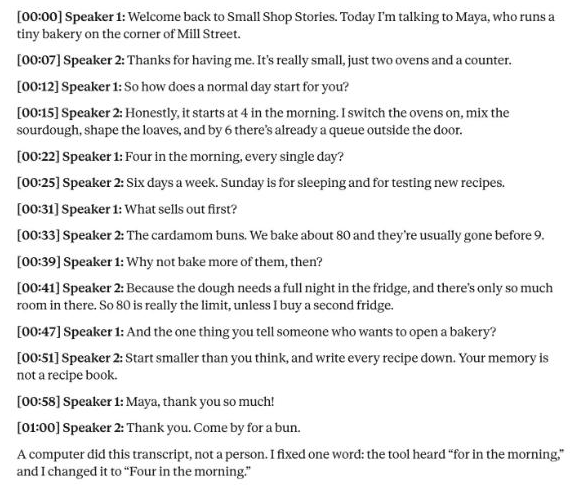
The whole turn took about 21 minutes. The answer itself was good:
| Check | Result |
|---|---|
| Words that differ from the script (model output) | 2 real errors: "Four in the morning?" came out as "for in the morning", and "the one thing you'd tell" as "you tell" |
| What Claude changed | It fixed "for" to "Four" from context and said so under the transcript |
| Final transcript | 1 real error ("you'd" → "you") |
| Speaker turns | 12 of 14 on the first pass (two host questions went to "Speaker 3" and "Speaker 4"), 14 of 14 after the re-run |
| Timestamps | One per turn, as asked |
Those two model errors are the same two our own engine made on this file in the transcript examples test. That isn't a surprise: both are Whisper models, and "four" and "for" sound the same.
What we'd keep in mind before relying on this route:
- It took 21 minutes for 64 seconds of audio. Most of that was setup, which starts again in every new chat, because the sandbox doesn't keep installed models.
- It used a long agent turn, a dozen commands on Opus. On a plan with usage limits, an hour of audio may not fit.
- The method changes from chat to chat. Claude picks the tools each time. We got Whisper medium.en; another run might pick a smaller model, or fail to download one.
- Claude edited the transcript. The fix was right and it told us, but a word-for-word transcript that's been corrected by a language model isn't word for word any more. For quotes, check against the audio.
With a transcription connector: one upload step, then the transcript
Connectors are MCP servers that add tools to Claude. We make one of them, ScribeToAny, so read this section with that in mind. Custom connectors work on every plan, but Anthropic's connector help page limits the Free plan to one custom connector.
We turned the ScribeToAny connector on, attached the same MP3 and asked Claude to "use ScribeToAny to transcribe this audio", followed by the test prompt. After about 50 seconds Claude answered that ScribeToAny couldn't take the file from the chat and gave us an upload link instead: open it, upload the file there, come back and say "done".
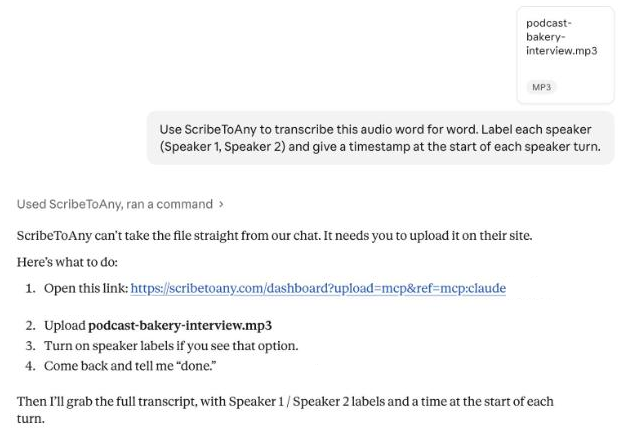
We followed the steps: opened the link, uploaded the MP3 in Accurate mode with
speaker detection set to two people, and typed "done". The transcription
itself took 21 seconds of GPU time. Claude then fetched the result and
answered in about 30 seconds, already in the format the prompt asked for: one
paragraph per speaker turn, Speaker 1 / Speaker 2 labels and a [m:ss]
timestamp at the start of each turn.
| Check | Result |
|---|---|
| Real errors | 2, the same two as the other routes' model output ("for in the morning", "you tell") |
| Speaker turns right | 14 of 14 |
| Timestamps | One per turn, as asked |
| What Claude changed | Nothing. It kept "For in the morning" as the engine wrote it and flagged it under the transcript as probably "Four" |
That last row is the difference from the sandbox route: the words stay the engine's, and Claude points at the doubtful one instead of changing it in the transcript.
Why the upload step? A file you attach stays in Claude's sandbox; a connector runs on someone else's server and only gets the arguments Claude sends in a tool call, which are text, not your file. We expect the same with other connectors, so with any transcription connector, a local file takes one of two paths:
- Upload it on the service's site through the link the connector gives you, then ask Claude for the transcript.
- Paste a link to the media instead of attaching it. ScribeToAny fetches public links from X, Twitch, Loom, Google Drive, Dropbox and direct media URLs; check what your connector supports.
One trap we hit: the upload link opens the service in your browser, and the transcript lands in whichever account the browser is signed in to. If that's not the account you connected to Claude, Claude won't find it.
To add a connector on claude.ai, go to Customize → Connectors, click + Add → Add custom connector, paste the server URL and sign in. The ScribeToAny URL and a one-click button are on ScribeToAny for Claude.
Claude Code: a local file in one command
Claude Code runs on your own computer, so it can hand a local file to any
transcription command line tool. We used ours, scribetoany (again: we make
it), on a free ScribeToAny account:
npm i -g scribetoany
scribetoany auth login
scribetoany transcribe podcast-bakery-interview.mp3 --speakers 2 --format srt
auth login opens the browser once to sign in. In Claude Code you can also
install the matching skill as a plugin (/plugin marketplace add scribetoany/skills, then /plugin install scribetoany@scribetoany-skills), so
"transcribe this file" is enough of a prompt.
It took 38 seconds end to end and wrote an .srt file with 30 subtitle
cues. Scored against the script:
| Check | Result |
|---|---|
| Real errors | 2, the same two as above ("for in the morning", "you tell") |
| Speaker turns right | 14 of 14 |
| Output | 30 timed segments, as TXT or SRT |
| What it changed | Nothing: it doesn't correct the text, so "for" stays "for" |
Every route compared
| Route | Works with a file on your computer | Who can use it | Speaker labels | Timestamps | Subtitle file (SRT/VTT) |
|---|---|---|---|---|---|
| Claude on its own (code sandbox) | Yes, attached | Every plan has the sandbox, per Anthropic; we tested Pro | If it builds them | If you ask | If it writes one |
| Voice mode | No: live speech only | Every plan (beta) | No | No | No |
| Transcription connector | Via the service's upload page, or a link | Every plan; Free allows one custom connector | Depends on the service | Depends on the service | Depends on the service |
| Claude Code + a CLI | Yes, directly | Claude Code users | Yes, with the CLI's option | Yes | Yes |
| Transcribe elsewhere, paste the text | Yes | Everyone | From the tool you used | From the tool you used | From the tool you used |
Which one to use
- One short file, no hurry, nothing to install: attach it and let Claude build its own pipeline. Expect it to take a while, and check names and numbers.
- Recordings you transcribe often, or anything long: a connector. You get a purpose-built engine, speaker labels and subtitle files, and the transcript stays in your account for later chats.
- A folder of files, or a script: Claude Code with a command line tool.
- You only need Claude to summarize or answer questions: transcribe anywhere, then paste or attach the text. Claude reads a TXT, DOCX or PDF transcript the same way it reads any document.
What we didn't test
- Free plan. Anthropic says the code sandbox is on every plan, but a 21-minute agent turn may run into Free usage limits. We only ran it on Pro.
- Long or noisy audio. One minute of clean synthetic speech is a best case. For what real recordings do to accuracy, see how accurate AI transcription is.
- Video files. Claude's sandbox has
ffmpeg, so it could probably pull the audio out of an MP4, but we didn't try. - Other connectors. We only ran ours.
Then ask Claude about the transcript
Once the text is in the chat, this is where Claude is strong. A prompt we use:
Here is a transcript with speaker labels and timestamps. List each
speaker's main points, quote the three most important sentences with
their timestamps, and flag any word that looks like a transcription
error.
For a two-person interview, also ask it to replace "Speaker 1" and "Speaker 2" with names. Working out who each voice is, as opposed to when it speaks, is the part of speaker diarization no model can do from audio alone.