
Can ChatGPT Transcribe Audio? We Retested After the October Update
Paid ChatGPT plans can now transcribe uploaded audio; the free plan still can't. We retested free ChatGPT and a transcription app on the same scored MP3.
Short answer: yes on paid plans, still no on the free plan. Since 6 October 2026, ChatGPT Plus and the other paid plans can transcribe an audio file you attach (MP3, WAV, M4A and other audio-only formats, but not a video with a picture). On the free plan, ChatGPT on its own still wouldn't transcribe our test file when we tried again on 25 October. With a transcription app connected, the free plan returned a full transcript in the chat.
ChatGPT now turns speech into text in five ways:
- Audio uploads transcribe a file you attach. Paid plans only.
- Dictation types what you say into the message box.
- Record mode transcribes live audio, in the macOS app on paid plans.
- An app in the chat sends the file to a transcription service and brings the transcript back. This works on the free plan too.
- OpenAI's API transcribes files from your own code.
We first ran this test on 4 October, two days before audio uploads arrived, and ChatGPT declined. This version adds the retest, the app, a video file and what OpenAI documents for paid plans, which we haven't tested ourselves.
The test: one scored MP3, one prompt
We used the same recording as in our transcript examples guide. It's a 64-second interview between two people: a podcast host and a baker. We made it for our product tutorial from a written script of 189 words and 14 speaker turns, with two text-to-speech voices, so any transcript of it can be scored word for word.
Every run used podcast-bakery-interview.mp3 (about 1 MB) in a new chat and
this prompt:
Transcribe this audio word for word. Label each speaker (Speaker 1,
Speaker 2) and give a timestamp at the start of each speaker turn.
| Run | Date | Result | Words that differ from the script | Speaker turns right |
|---|---|---|---|---|
| Free plan, ChatGPT on its own | 4 Oct | Declined after 8 s (default) and 12 s (Think mode) | n/a | n/a |
| Free plan, ChatGPT on its own | 25 Oct | Declined after 22 s | n/a | n/a |
| Free plan, with the ScribeToAny app | 25 Oct | Full transcript after one follow-up question | 3 of 189 (1 real error) | 14 of 14 |
| Paid plan, audio upload | not tested | See what OpenAI says |
The free plan on its own: still no transcript
On 4 October, default mode (the page reported the model as gpt-5-6)
said it could see the file and that it was about a minute long, but that it
had no audio transcription capability in that chat. Think mode
(gpt-5-6-t-mini) measured the file as about 1 minute 3.6 seconds, which is
right, then said it couldn't decode the audio and wouldn't produce a
transcript "without risking making up text".
On 25 October we tried again in a temporary chat and added "don't use any plugins or apps" to the prompt, so that only ChatGPT itself could answer. It ran four analysis steps over 22 seconds, measured the file at about 1 minute 4 seconds, and declined again.
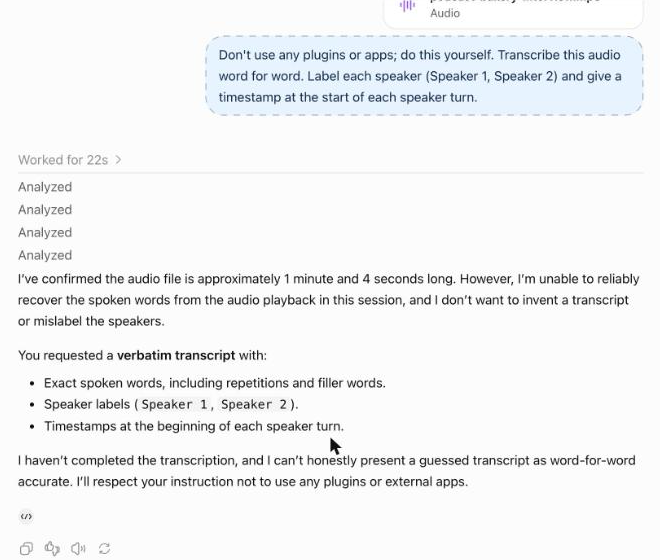
That matches OpenAI's help page, which says audio uploads "are not available on the Free plan at this time". The refusal is also the right behaviour: a confident fake transcript would be worse than none.
With a transcription app: the transcript lands in the chat
Apps add tools to a ChatGPT chat. We make one of them, ScribeToAny, so read this section with that in mind. It's installed from ChatGPT's app directory; the setup is in ScribeToAny for ChatGPT. The transcribing is done by ScribeToAny's engine, not by ChatGPT.
We sent the same file and prompt in a normal chat, without naming the app. ChatGPT handed the file to it anyway and turned on speaker labels because the prompt asked for them. Then it stopped:
- After 46 seconds ChatGPT said the audio was still processing and linked to the transcript page. The job itself took 41 seconds (from our server log), so ChatGPT gave up just before it finished.
- We asked "Is it done now? Show me the transcript." Eleven seconds later the
full transcript was in the chat, with
[mm:ss]timestamps and speaker labels.
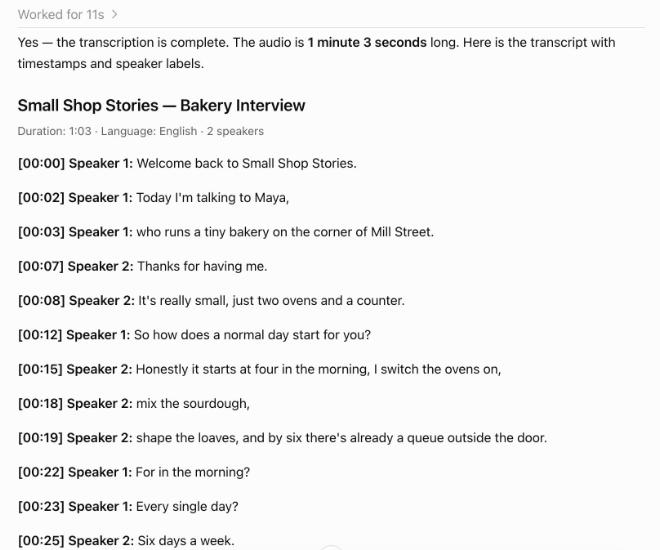
Against the script:
- 1 real error. "Four in the morning?" came out as "For in the morning?". ChatGPT flagged that line itself and suggested checking it.
- 2 style differences. "eighty" was written as "80", twice.
- 14 of 14 speaker turns went to the right speaker, including the two answers we had sped up.
The earlier run of the same engine in our transcript examples had one more error ("you'd" came out as "you"), so expect a word or two to move between runs.
Two limits apply here. ChatGPT's free plan allows 3 file uploads a day, and ScribeToAny's free plan transcribes 2 files a day, up to 30 minutes each and 100 minutes a month. A longer file is transcribed up to minute 30, and the reply says so.
A video file: only the app took it
OpenAI's help page says MP4 and WebM files "identified as video are not supported by audio uploads". Many recordings people want to transcribe are exactly that: a screen recording, a Zoom file, a downloaded clip.
So we wrapped the same audio in an MP4 with a picture and asked, again
without naming the app, "Transcribe this video and give me SRT subtitles."
ChatGPT sent it to ScribeToAny, which took 61 seconds. After the same one
follow-up question, ChatGPT returned a downloadable .srt file with 30
subtitle cues and speaker labels. We didn't run the MP4 through a paid plan,
so we can't say how audio uploads handle it beyond what the help page states.
Paid plans: what OpenAI documents
We haven't tested audio uploads on a paid plan. This is what OpenAI's uploading files and audio help page said when we checked it on 25 October 2026, and the release notes date the feature to 6 October:
- Who gets it: paid subscriptions and workspaces, including Enterprise. Not the Free plan. Availability "may vary" by workspace settings, region, app version and model.
- Formats: WAV, MP3/MPEG, OGG/OGA, audio-only WebM, PCM, FLAC, AAC, M4A and audio-only MP4. The file must contain a decodable audio stream.
- Size: up to 512 MB per file. Longer recordings "may be processed in smaller sections" when Data Analysis is available; processing is best-effort and "very long recordings may time out".
- Accuracy: OpenAI's own warning is that transcripts "may contain errors, and speaker identification may be unreliable", and that performance varies by language.
Every route compared
From OpenAI's help pages (audio uploads, Voice Dictation FAQ, ChatGPT Record) and the API's speech-to-text guide:
| Option | What it transcribes | Who can use it | Speaker labels | Timestamps |
|---|---|---|---|---|
| Audio upload in a chat | An audio file you attach, up to 512 MB; not video with a picture | Paid plans only | Yes, "may be unreliable" per OpenAI | If you ask |
| Dictation (microphone icon) | What you say, typed into the message box for you to edit | ChatGPT users; the help article lists no plan limits | No | No |
| Record mode | A live recording of a meeting or voice note, then notes. Up to 4 hours per session | Plus, Pro, Business, Enterprise and Edu, in the macOS desktop app only | Yes: generic labels such as "Speaker 1", which you can rename | Not described in the help article |
| An app in the chat (such as ScribeToAny, which we make) | An audio or video file you attach, transcribed by the app's own engine | Worked on the free plan in our test; the app's own limits apply | Yes, if you ask | Yes, and SRT/VTT files |
OpenAI API (gpt-transcribe, gpt-4o-transcribe, whisper-1 and others) | An audio or video file you send from your own code, up to 25 MB | Developers with an API account (pay per use) | With gpt-4o-transcribe-diarize | With whisper-1 (word or segment level) |
Two details from those docs matter in practice. Record mode records; it
doesn't import. The help article describes pressing Record and transcribing
as you talk, not feeding it a file you already have. And in the API,
timestamps and speaker labels come from different models: timestamps need
whisper-1 and speaker labels need the diarization model, so a subtitle file
with both takes more than one call.
Which one to use
Audio uploads, if you're on a paid plan, the file is audio only, and what you want is a summary, notes or answers about the recording rather than an exact transcript. That's what the feature is designed around.
Record mode, if you're on a paid plan, you use a Mac, and the audio is happening now: a meeting, a brainstorm, a voice note.
An app or a dedicated transcription tool, if any of these apply:
- you're on the free plan,
- the file is a video,
- you need an
.srtor.vttsubtitle file, or timestamps on every line, - the recording is long and you need all of it, not a best-effort pass,
- you want to check the transcript line by line against the audio before quoting it.
What dedicated tools cost per hour of audio is in our transcription pricing comparison.
Transcribe first, then ask ChatGPT
ChatGPT is good at what comes after the transcript: summarising it, pulling out action items, writing chapter titles, drafting show notes. With an app connected, that's one chat: the transcript arrives, and you ask for the summary next. Without one:
- Transcribe the recording with a tool built for it, such as the audio to text or video to text tools. Turn on speaker detection for interviews and meetings.
- Check the transcript against the audio, especially names, numbers and anything you'll quote. Our test's one error was a number word ("four"), the kind of mistake AI transcription accuracy tests keep finding.
- Paste it into ChatGPT and ask for the summary or chapters.
What we didn't test: a paid ChatGPT plan, the mobile apps, languages other than English, and files longer than a minute. ChatGPT changes often, so try your own file before you rely on any of these answers.